

But Azure integration platform also happens to be one of the most cost-effective, flexible, and secure iPaaS on the market. Hosted and managed for you in the cloud, Azure iPaaS empowers you to connect any variety of on-premises and cloud software with the latest tools.
In this article we’re going to answer the question “What is Azure Integration Services?” by covering the fundamental Azure iPaaS components.
Overview of Azure Integration Services
- build integration workflows
- use pre-built connectors
- connect to on-premises systems
- work with messaging and events
- manage and mediate APIs
Building integration workflows
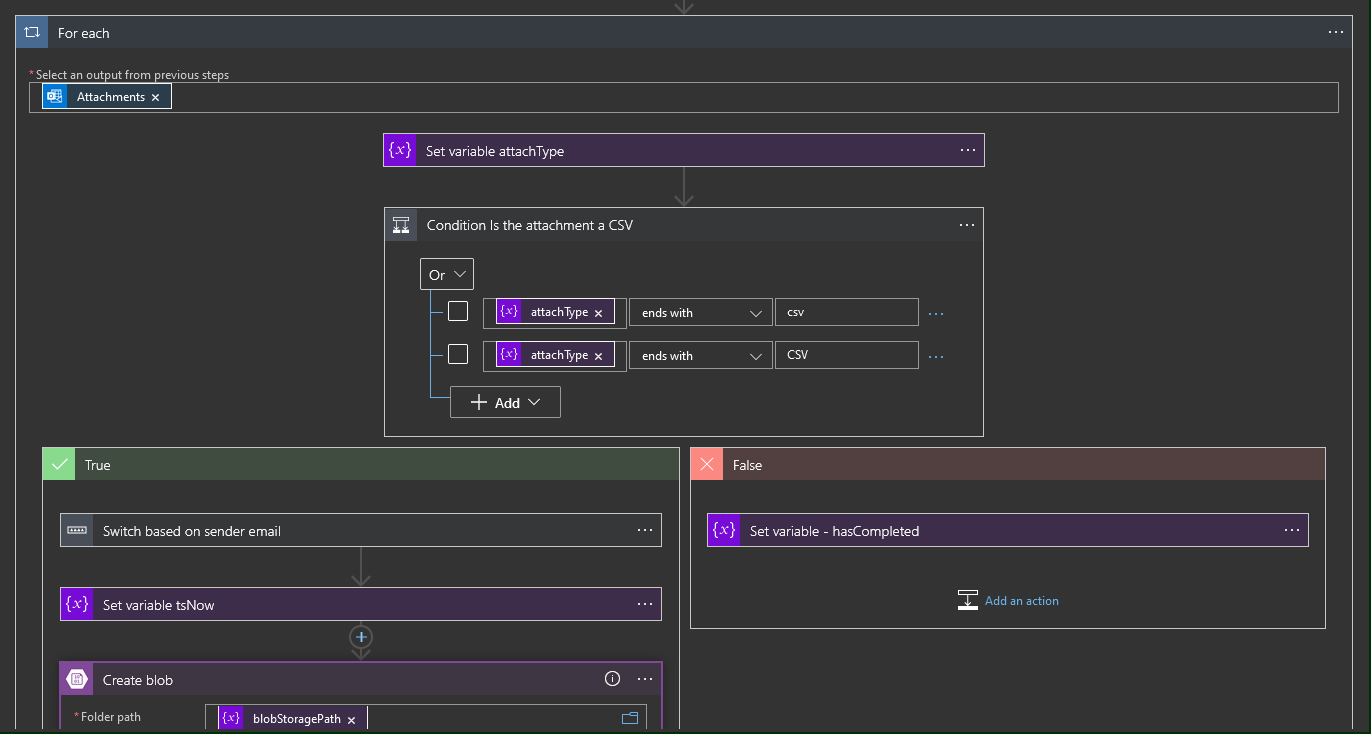
Using pre-built Azure connectors
- Protocol Connectors: FTP, HTTP, RSS, SFTP, SMTP, SOAP pass-through, SOAP-to-REST, WebHook, AS2
- Hybrid Connectors: MySQL, Oracle DB, PostgreSQL, REST, SAP, SharePoint, SQL Server
- Azure Connectors: Azure Blob Storage, Azure Data Lake, Azure Data Factory, Azure ML, Azure Table Storage
- Other Microsoft Connectors: Dynamics 365, Microsoft Teams, Office 365 Excel, Office 365 Outlook, Power BI
- Third-Party SaaS Connectors: Google, social media, Slack, Mailchimp, GitHub, Intercom, Salesforce, Workday
Connecting to on-premises systems
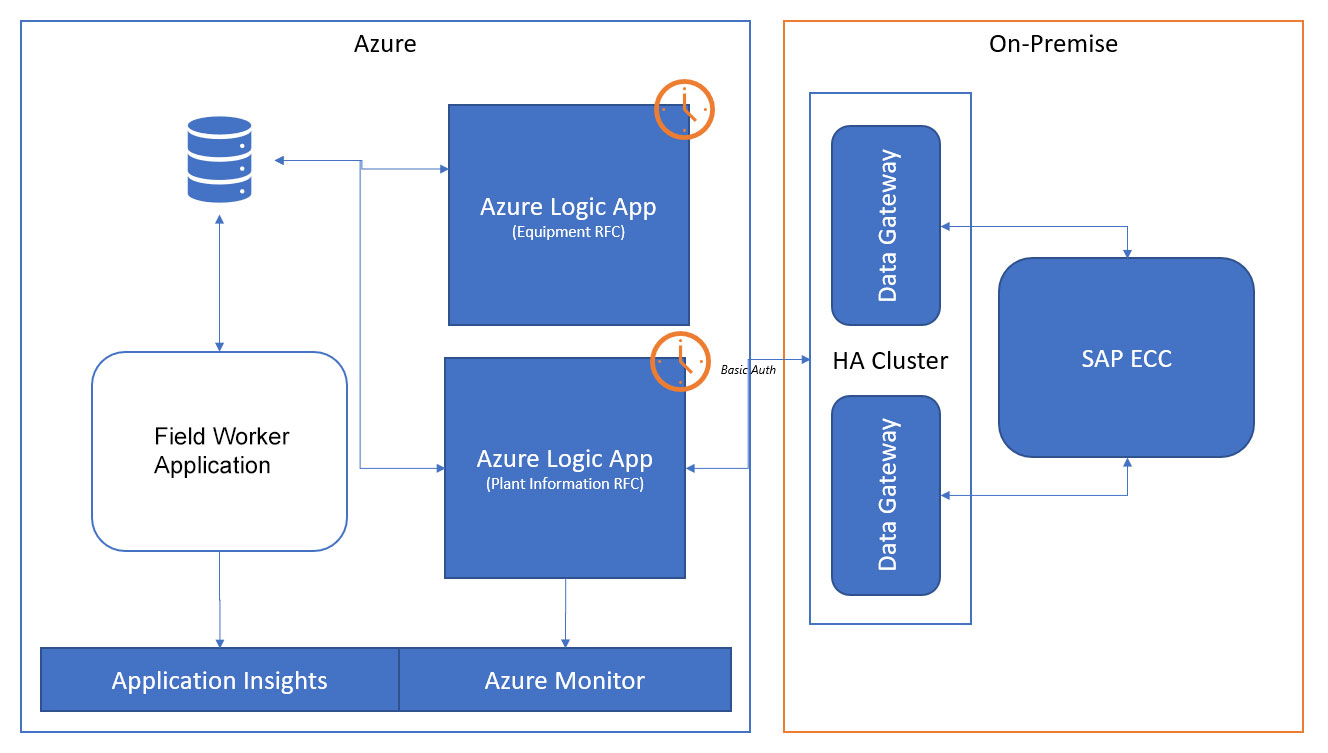
To ensure security, a managed Service Bus Relay uses encrypted channels for all the data exchange between Azure and your on-premises systems. You can also install the gateway on multiple VMs to provide higher availability. See an example architecture using the on-premises data gateway below (click for a full screen view).
Using custom code and connectors
You can then use Logic Apps to call those functions synchronously with HTTP or asynchronously with Azure Service Bus or Azure Event Grid. This enables you to exchange messages with applications that have no pre-built connector.
Leveraging messaging and events
Azure Service Bus Messaging
- temporal decoupling
- load balancing of message processing for competing consumers
- creating a publish and subscribe pattern with Service Bus Topics
Azure Event Grid
Managing full-lifecycle APIs
- securing APIs with authentication and authorisation methods such as Azure AD, plus use of client certificates
- publishing APIs and speeding up the on-boarding process with a developer’s portal
- managing consumer accounts
- connecting to other secured resources and on-premises APIs with VNET connectivity
- improving API response times through caching
- throttling requests
- routing and forwarding
- transforming requests by changing the method or implementing richer transformation policies
- tracing calls and logging requests through Event Hubs
- monitoring and analysing usage and health of APIs
- creating mock responses
- monetising APIs
- provide security in a similar way to App Services
- modify requests and responses, which is also useful for creating mock APIs
- consolidate multiple APIs into simpler URL routes
Monitoring integration performance
Tools for Azure iPaaS development
How businesses use Azure Integration Services
Because Azure iPaaS is such a flexible platform, there is virtually no variety of software that it cannot integrate. For real-life examples, see some of our recent Azure integration projects below:
Get the best value from Azure
We’re a Microsoft Partner with decades of integration experience. So whatever you need to connect with Azure, our experts will provide end-to-end consultation, development, and support.